

Description
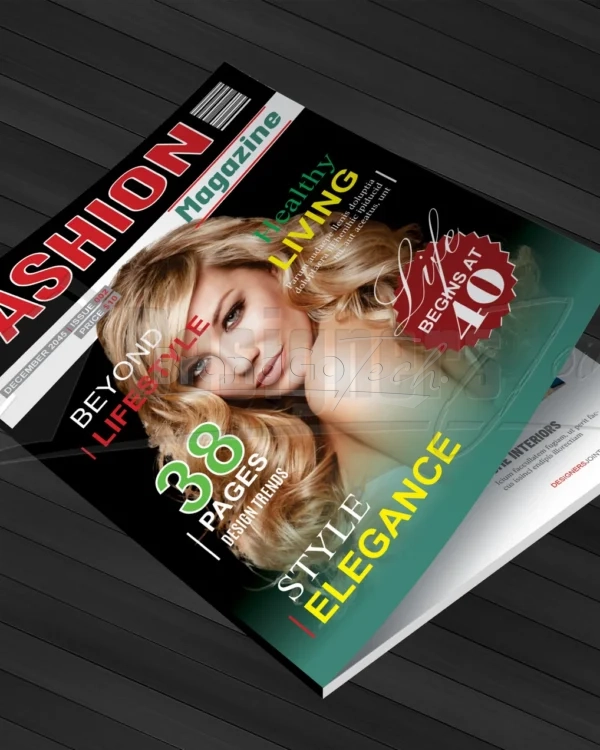
Take your publication to the next level with this professionally designed 38 Page Magazine Template for CorelDRAW. Clean, modern, and fully editable—this layout is perfect for magazines, brochures, lookbooks, reports, and more.
Crafted for creatives, marketers, and publishers who want a polished look without the hassle of designing from scratch.
🔑 Features:
- 38 Unique Page Layouts – includes cover, contents, article spreads, image features, quotes, ads, and more
- CorelDRAW (.CDR) Format – fully editable and layered
- A4 Size + Bleed (Print-Ready)
- CMYK, 300 DPI Resolution
-
Free Fonts Used
📌 Perfect For:
- Lifestyle & fashion magazines
- Company brochures & brand catalogs
- Photography or art portfolios
- Travel, health, or wellness features
- Digital or printed publications
🛠️ Fully Customizable:
Easily swap images, edit text, adjust colors, and change fonts to match your brand. Whether you’re a pro designer or just starting out, this template offers creative freedom and visual consistency in every page.
Save time, stay on-brand, and publish like a pro. Download your 38 Page CorelDRAW Magazine Template today and make your next publication shine.


Reinhold –
File sizes are optimized. No lag in editing.
Genevieve –
The master pages are a godsend. It’s so easy to maintain consistency across the entire publication.
Eulalia –
The layouts for the feature articles are particularly strong. They offer a dynamic visual flow that kept the reader engaged.
Gregorio –
It’s well organized and easy to navigate, even for someone who’s not an InDesign expert.
Yessenia –
Saved me days of design work.