

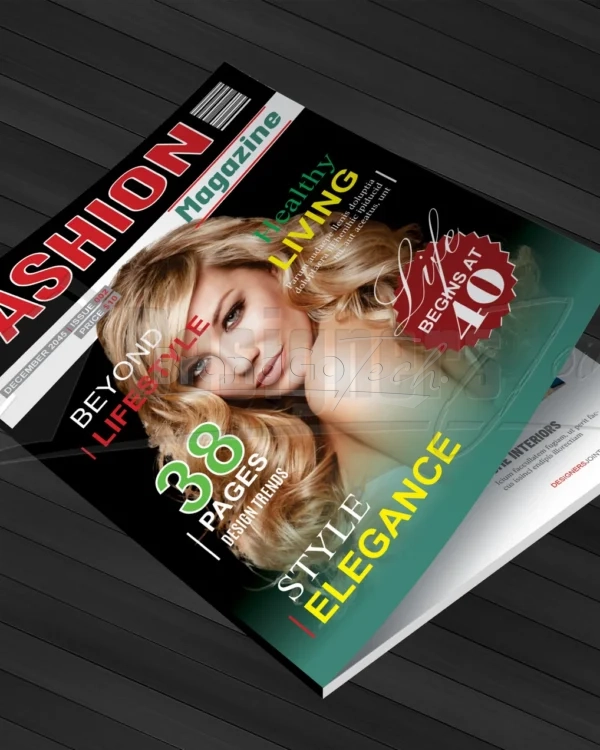
38 Page CorelDRAW Magazine Template

38 Page CorelDRAW Magazine Template

(42 customer reviews)

Original price was: KSh2,500.Current price is: KSh1,500.

File Information:

  • Zip File Size: 6.97MB
  • Pages: 38 Page Magazine
  • Size: A4 (210 X 297 MM) Bleed 3MM
  • Minimum CorelDRAW version: 21 or higher
  • Resolution: 300 dpi
  • Color mode: CMYK


Category: File type:

Description

Take your publication to the next level with this professionally designed 38 Page Magazine Template for CorelDRAW. Clean, modern, and fully editable—this layout is perfect for magazines, brochures, lookbooks, reports, and more.

Crafted for creatives, marketers, and publishers who want a polished look without the hassle of designing from scratch.

🔑 Features:

  • 38 Unique Page Layouts – includes cover, contents, article spreads, image features, quotes, ads, and more
  • CorelDRAW (.CDR) Format – fully editable and layered
  • A4 Size + Bleed (Print-Ready)
  • CMYK, 300 DPI Resolution
  • Free Fonts Used

📌 Perfect For:

  • Lifestyle & fashion magazines
  • Company brochures & brand catalogs
  • Photography or art portfolios
  • Travel, health, or wellness features
  • Digital or printed publications

🛠️ Fully Customizable:

Easily swap images, edit text, adjust colors, and change fonts to match your brand. Whether you’re a pro designer or just starting out, this template offers creative freedom and visual consistency in every page.


Save time, stay on-brand, and publish like a pro. Download your 38 Page CorelDRAW Magazine Template today and make your next publication shine.

42 reviews for 38 Page CorelDRAW Magazine Template

  1. Isaias

    Saved me days of design work.

  2. Ned

    The color palette is excellent and easy to work with. It’s not just a bunch of random layouts.

  3. Landen

    The color palette is excellent and easy to work with. It’s not just a bunch of random layouts.

  4. Ruthie

    The grid system is on point—keeps everything aligned beautifully.

  5. Devin

    Looks great in both CMYK and RGB versions.

  6. Adriel

    Good, but not perfect. The font choices were a little too trendy for my client, but the underlying structure was excellent and easy to adapt.

  7. Nathan

    Looks great in both CMYK and RGB versions.

  8. Melba

    The creative layouts sparked new ideas for me.

  9. Anissa

    This is the best template I’ve ever purchased. The layers are organized and labeled, and it includes pre-designed ad spaces, which is a huge bonus.

  10. Virginia

    Really intuitive for designers and non-designers alike.

  11. Adam

    Loved how flexible the grid was.

  12. Yasmin

    I used this for a personal project and couldn’t be happier. The photo layouts are stunning and make even amateur photography look professional.

  13. Bailey

    Very professional aesthetic. Clean lines.

  14. Murphy

    My client said it looked like a Condé Nast mag.

  15. Edward

    The master pages are a godsend. It’s so easy to maintain consistency across the entire publication.

  16. Stephens

    My client thought I designed it from scratch. That’s how good it looks.

  17. Whitney

    Everything aligned perfectly thanks to the grids.

  18. Ashly

    The variety of headline and subheading styles is impressive. It gave me a lot of creative freedom.

  19. Adelia

    The spreads flow naturally—excellent pacing.

  20. Antwon

    A few of the pre-set layouts felt a bit cramped on a smaller page size, but overall, it’s a solid product.

  21. Syble

    The stylesheets made edits quick and painless.

  22. Edwards

    The variety of column layouts is great. It’s not just a boring three-column grid.

  23. Van

    I had a question about the grid and the support was responsive and helpful.

  24. Rhoda

    The attention to detail is what sets this apart. The paragraph styles are nested and named correctly.

  25. Larry

    I’ve recommended this template to all my design students. It’s a great learning tool.

  26. Emerald

    I love the way the section dividers are designed. Very modern and clean.

  27. Estrella

    The master pages are a game-changer. I will never design a magazine from scratch again.

  28. Oliver

    Every spread feels editorial and magazine-ready.

  29. Myrtice

    The paragraph styles and character styles are a godsend. It’s so easy to maintain consistency.

  30. Joyce

    The article intros are beautifully designed. It really sets the tone for the content.

  31. Yessenia

    Saved me days of design work.

  32. Gregorio

    It’s well organized and easy to navigate, even for someone who’s not an InDesign expert.

  33. Eulalia

    The layouts for the feature articles are particularly strong. They offer a dynamic visual flow that kept the reader engaged.

  34. Genevieve

    The master pages are a godsend. It’s so easy to maintain consistency across the entire publication.

  35. Reinhold

    File sizes are optimized. No lag in editing.

  36. Kristoffer

    The cover design alone is worth it.

  37. Anjali

    Typography combinations are just right.

  38. Kennedi

    I used this for a personal project and couldn’t be happier. The photo layouts are stunning and make even amateur photography look professional.

  39. Dominique

    A professional and reliable resource. It’s worth every penny.

  40. Darrick

    This template is so versatile. I’ve already used it for both a fashion magazine and a corporate annual report.

  41. Terence

    It was a little difficult to change the color palette globally, but it wasn’t a deal-breaker.

  42. Amiya

    My photography portfolio looked stunning in it.

Add a review
To Pay In